Algorithmic Trading System
Abstract
This is a project I have been working on since university. The stock market has always seemed like this grand game to me, where thousands of people participate and the prize is something more than pride, more than glory–it's something everyone wants... money.
Infrastructure Breakdown
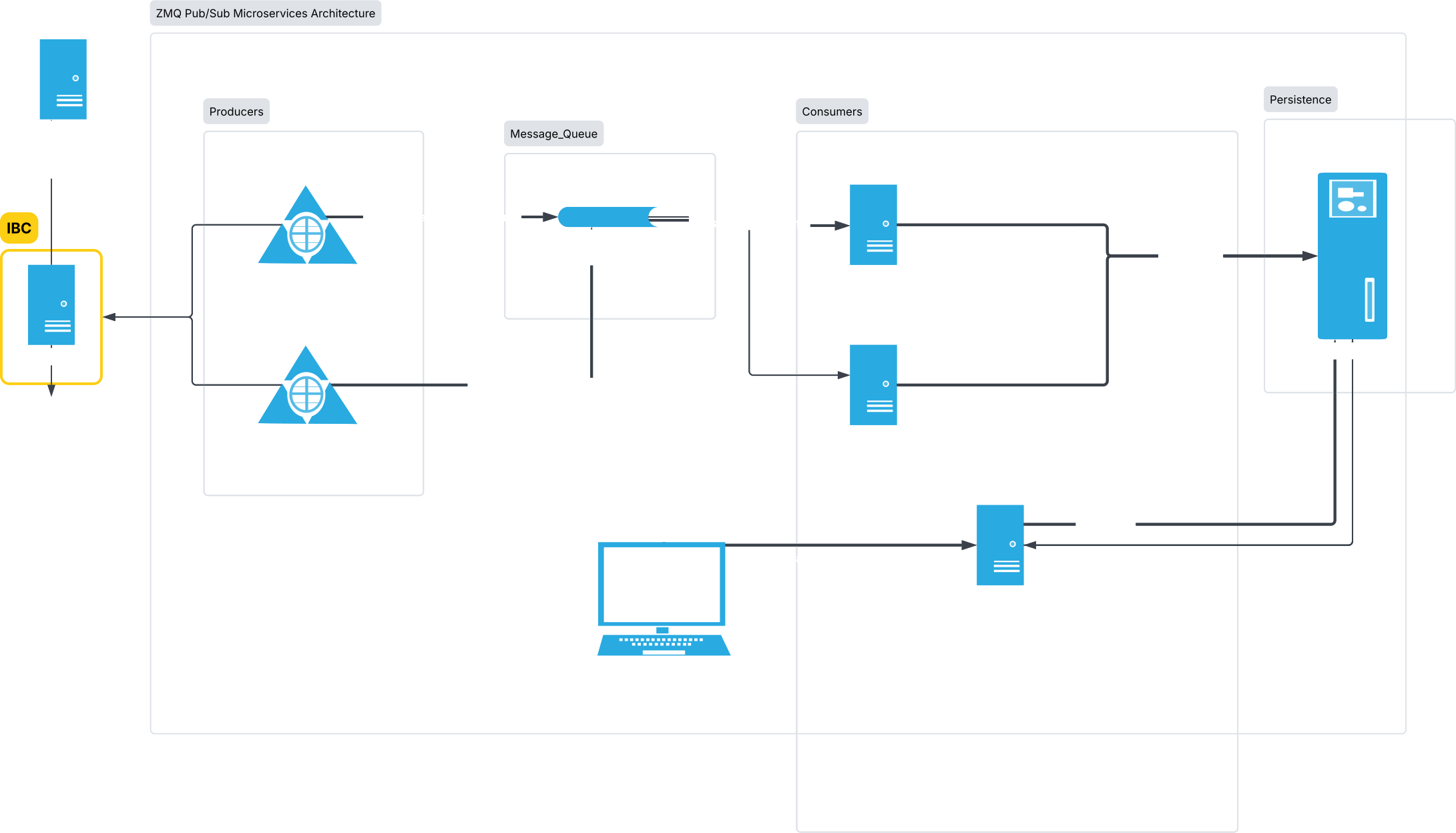
The code interfaces with Interactive Brokers using its Python API. The IBgateway acts as a network gateway between my home internet and IB's servers. All micro-services, including the gateway are hosted on a single PC in my basement. So everything in the architecture diagram is a logical separation until further compute is available. To manage the IB gateway, I use an open source tool called IBC (IB controller). It handles auto login and timeout recovery by interacting with the GUI of the gateway. It's not perfect, but it adds some robustness to our most critical failure point.
My services can be broadly categorized into Server-Worker pattern. Servers connect directly to the gateway and act as central handlers for market data and order management. These components include the master market data client, the master order client, and the stock screener service. The data is then multiplexed via a message queue to workers, which perform calculations and route orders back through the master order client.
This was the best approach due to how the IB API is designed and was decided based on the following constraints
- Orders are required to have a globally unique order ID, so it is better to have a single entity handle it.
- It is inefficient to request possibly duplicated market data from multiple clients.
- IB gateway limits the maximum number of concurrent client connections to 10.
Designing for Failure on a budget
In a professional software development setting, we are constantly thinking about how things could fail, both at a software level and a hardware level. We have failovers, graceful restarts, state restoration, and many other solutions. In a personal project setting, I believe we face diminishing returns on redundancy. How effective are Docker auto-rebuilds when everything is hosted on my 12-year-old PC? How useful is Grafana when my internet connection dies and I can no longer access my brokerage account? Therefore, instead of trying to prevent failure, I coded expecting it. The system is designed assuming my power could go out at any moment. This meant offloading as much calculation as possible to IB’s servers. For example, I would never open a position without a stop-loss order attached. From my perspective, even as system redundancies improve, I still need to ensure that my trading system can survive the worst-case scenario. To me, that means embracing failure rather than trying to prevent it.
System Visibility
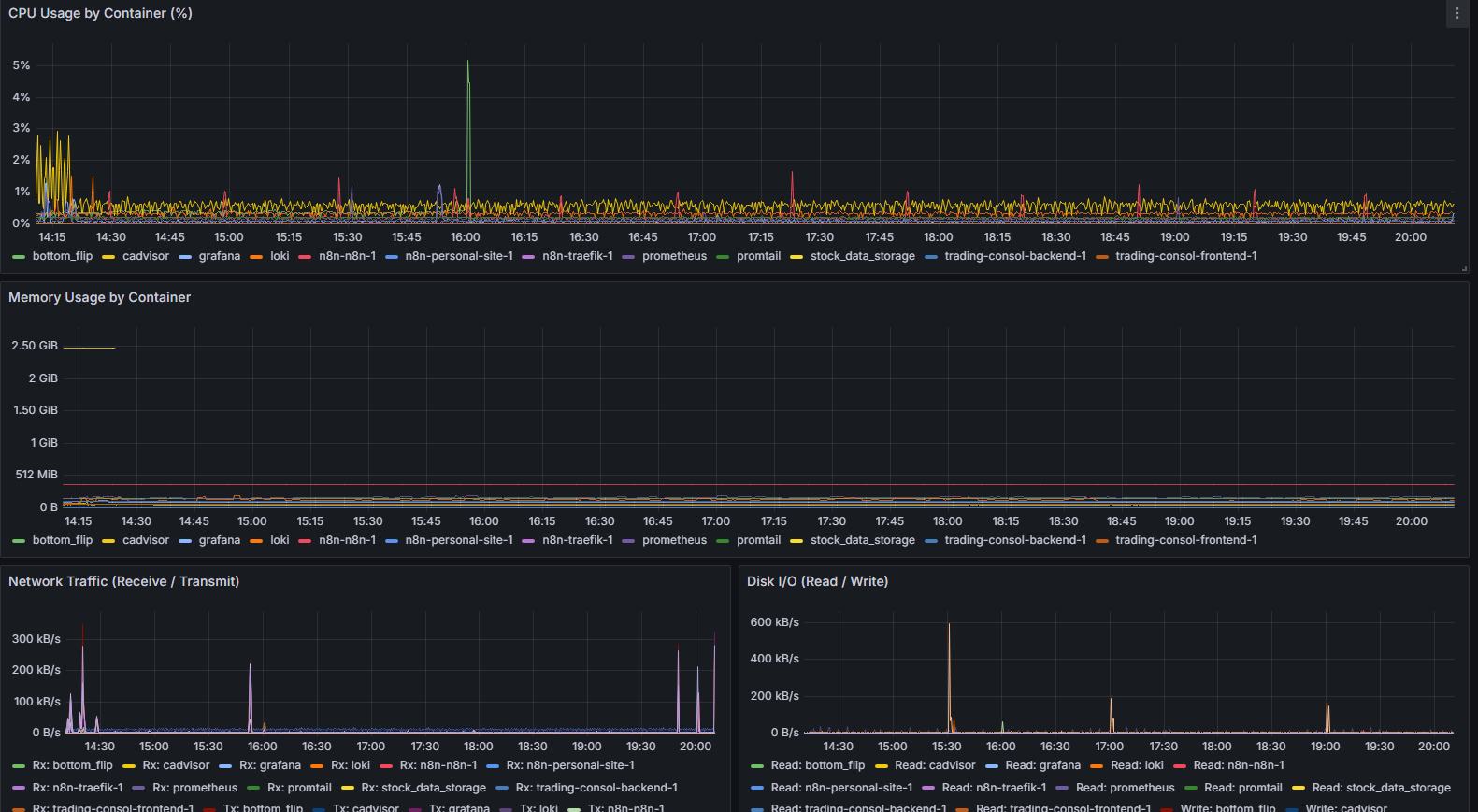
It's critically important to see what your systems are doing. To view the logs and performance of containers, Grafana, Loki, and Prometheus seem to be the standard. At the start, I didn’t bother with complex monitoring. I only set up critical alerts that pinged me using Discord. While writing this post, I took the chance to set up Grafana, Loki, and Prometheus, and I have to admit it was much easier than I thought. It only took a couple of hours of back-and-forth with Claude to have everything up and running. Everything works out of the box with dockerized services, so all you have to do is compose up and forget. Tracking CPU usage, memory, and I/O really helped me understand how my services are performing and where the bottlenecks are.
IB Controller
Stock Screener
The purpose of the stock screener service is to find “in Play” stocks in real time using IB’s built in market scanner. I configure it with different parameters to find stocks that are experiencing volatility.
The IB scanner is a subscription service that provides callbacks every minute by default. To increase the polling rate, I continuously cancel and resubscribe. To determine if a stock is “in play” I consider the following criterion.
- Currently trading between $0.5 - $25
- Cumulative volume of at least 1 Million (measured from 4am)
- Current volume 3 times above average (spiking volume)
- Total float below 15M shares
The architecture of the scanner is fairly simple. We have a main thread and a callback thread. The main thread calls reqScannerSubscription() for each scan code and then waits on an event for the scanner callbacks to run. Once all the tickers have been saved to a dictionary, the main thread continues. It filters out stocks that do not meet the float requirement, along with duplicates and ETFs. We then request news and live market snapshots for those securities and push them to the PUB-SUB message queue.
Processing Level 1 Market Data in IB
Originally, I tried using reqMktData() for a live connection. It's the most obvious choice—just looking at the name—but at this point, I think it's more of a legacy service with several drawbacks. The design of reqMktData() is problematic: instead of receiving actual ticks, you are sampling and aggregating data every 250ms. That in itself is fine, because approximating order flow is sufficient for my strategies. The real problem lies in how the data is presented. Data is returned via two separate callbacks, TickPrice() and TickSize(). TickPrice() returns the bid, ask, and last traded price, while TickSize() returns the corresponding bid size, ask size, and last trade volume. The issue is that the order of these callbacks is not guaranteed. Therefore, it is entirely possible to incorrectly classify buy and sell orders, especially when trading the highly volatile securities I focus on.
Market Data Master
The market data master is the central client that requests live market data from IB’s servers. Strategy services subscribe to the market data master using a ZeroMQ ROUTER/DEALER socket and receive updates via a ZeroMQ PUB/SUB socket. When a client requests data from the market data master, it first receives a backlog of historical bars (1-minute, 5-minute, etc.) to populate any indicators or lookback windows. It then begins receiving "live" data (1-second bar updates). If any two clients call for the same ticker, the second receives the cached historical bars plus any delta from the time the first client joined to the current time. Finally, the client joins the message queue as a consumer of live data.
Purpose
The purpose of the Market Data Master is to multiplex market data lines in the case of multiple strategies requesting the same ticker. It also allows us to easily manage market data limitations, as we do not have to coordinate multiple independent clients connecting to IB.
Code Breakdown
When a client sends a request, they provide their sender address, and command_id (the requested unique identifier). The command_id is used on the client side to acknowledge that the server has responded to outgoing requests. The sender address is set to a fixed string, which must be unique across strategies. This way if a client disconnects its state within the server object is preserved, it also helps with debugging messages.
The handle subscribe handles two cases.
- 1. The first subscriber to a ticker
- 2. Subsequent subscribers to a given ticker
If a given sender is the first to subscribe to a ticker then the Data Master will call reqHistoricaldata(). Create a publisher stream for that ticker, and then return the historical backfill. While handling multiple subscribers the Data Master must maintain the consistency of its historical data cache. The cache is populated by these three callbacks. historicalData(), historicalDataEnd(), historicalDataUpdate(). For the sake of correctness I assumed it would be possible for IB to send updates out of order. Meaning that while historicalData() is filling up the historical portion of our cache, historicalDataUpdate() can also fire with live bars. This leaves the cache in two possible states.
- 1. Seeded - historicalData() has run and is now synced with live data
- 2. Unseeded - historicalData() has not run, and has possible desync with live data
If historicalDataUpdate() fires before seeding is complete. It will be put into a pending_bar list. Which mirrors how the main cache itself is updated with new bars. Once historicalDataEnd() runs, if there are any pending bars, they will be merged into the main cache.
Market Proto
The proto Design is pretty straight forward in this case. We need an OHCL bar object and some req/resp machinery
Market Data Client
The purpose of the market data client is for strategies to be able to manage market data streams in a reusable way. It allows clients to:
- 1. Access the current live price
- 2. Store a record of previous prices
- 3. Access a livestream of Tick Data
- 4. Access a livestream of Tick Data
The general interaction from the client side is as follows: The client sends a request → It gets backfilled 1 minute bars for the whole day up to this point → It gets a live connection to bar updates. The problem I ran into had to do with the synchronization of historical data and live data when multiple clients were involved. The server maintains its own historical cache, updated every minute, using its own output stream of live bars. Suppose a scenario where the client requests data at 9:01:59, the cache contains bars up to 9:01, the backfill stream takes 2 seconds to complete. So we end up missing the final update for the 9:02 bar on the client side. My workaround to this race condition was to invert the order. We establish the connection to live data first on the client side, and start tracking any updates, then I pull a backfill from the data masters cache. This guarantees that anything we missed will be caught in the backfill.
Market Data Thread
The market data thread handles reading data from ZMQ, and updating the Candle Store. The Market Data Thread is responsible for sending out requests,receiving and formatting replies and managing timeouts.
Candle Store
The market data book is the shared memory which holds all the local history and the current live bar for the client. The Market Data thread reads from the ZMQ sockets and writes the Data Book. Concurrently, the client can query the book to read bars and fill indicators. The Data book is in charge of resolving the consistency of the data, once historical data comes in, it will merge that with the live data, effectively syncing the client to the same timestep as the Data master.
Order Master
The order client is the central client which routes all orders to IB's servers. Using the message queue, independent strategies send their order requests to the order client, which tags each order with a unique ID, and sends it to IB.
Purpose
Reuse code, else we would have to implement order management for every strategy, as well as connect it to IB. Allows us to expand the number of strategies unbounded by the IB client connection limit.
Order Proto
For the proto design, I just mimicked the IB Order object, allowing support for every order type that we might use. IB will just ignore the values of fields that are unrelated to the order you are sending. Currently supporting the following orders:
- 1. Limit
- 2. Market
- 3. Stop/Market if touched
- 4. Stop Limit/ Limit if touched
- 5. Dynamic Stop
Order Client
The purpose of the order client is for strategy microservices to be able to access order updates, and send orders in a synchronous manner. The client encapsulates interaction with the Order Master in a reusable way. The client has three components.
- 1. The order thread, a separate thread used to receive and send messages into the ZMQ socket going to Order Master.
- 2. The order book, shared memory that tracks the states of orders as updates come from the Order Master.
- 3. The client wrapper, the user facing interface that clients can call to wait for an order to fill, check the status of the order or submit a new order
Order Thread
The client communicates with the order thread using a python Queue (which is thread safe). New requests get put into the outgoing messages queue, and a future is declared. The future tracks the acknowledgement from the Order Master that the order has been submitted if the future times out, then we raise an network error.
Order Book
When responses from the message queue come in, the Order thread writes the updated state of the order to the orderbook. This is the shared object that both the Client Thread, the Order Thread touch.
Client wrapper
The client thread provides public facing functions to check the status of an order as well as submit, cancel and modify orders. Each function call returns a response object giving a status update from the server, if the response is None, it means the server did not process the request and an error is sent to me on discord.
Admin Client & Order Validator
The validator service exists to reconcile the state of the Order Service (orders being sent out, and filled) with the accounting service (IB reqAccountDetails callback). The positions being reported by the order service should be reflected in our IB account details. If there is a drift between the two, the validator will send out an alert for manual review. The Validator receives universal order updates from a dedicated socket coming out of Order Master. The messages are sorted by strategy ID and the net positions holding are summed in memory. This result is checked against the data the Validator receives from IB which is a streamed callback updating each time a net position changes. When deciding the synchronization for the Validator my main focus was on eliminating false positives, so the alert rules are very strict.
Essentially the problem is that we have to reconcile two independent data streams, with their own network speed, and zero ordering guarantees. This can never be done 100% reliably, but there is a threshold where a divergence is worth reporting. For instance if a ticker is highly traded, then we will essentially be unable to check it. We would be getting two streams, one detailing the constantly changing position sizes. Eg (10 AAPL, 20 AAPL, 15 AAPL,40 AAPL). The other detailing all deltas +10 AAPL +10AAPL -5 AAPL +15 AAPL. The problem is that we cannot find a single timeslice to compare states at, since information is continuous and could be coming out of order. The only time we can make an informed comparison is when there is a pause in data incoming. If during this pause there is a divergence between the net positions. It could indicate a problem, the longer this divergence lasts, the higher the likelihood that we have identified a true problem. Therefore, the Validator waits for a 2s silence for a given symbol. Then runs a state check, if the state check comes back divergent the validator waits for another 5s. If no further updates come for that ticker during this window, the validator will report an error. If an update does arrive the validator will restart the checking process again waiting for another silence. This system works because I don't run any high frequency trading strategies. Typically just one trade per a ticker a day. Second, the system should perform as expected 99% of the time, the goal of the validator is to look for any anomalies, so the error checking is strict by design. In the worst possible case divergences will be reported at EOD at the latest.
Frontend Bridge Service
The frontend bridge is a smaller tertiary service that exists to convert ZMQ messages into Websocket messages. It allows me to monitor messages being sent between services on the frontend. For instance, I can monitor all the orders being routed by the Order Service, or all the data streams currently being requested by the Market Data Service.
Batch Data Collection Service
The data collection service manages all the non-realtime batch jobs that keep the system functioning under the hood. I use APScheduler to organize everything. I chose APScheduler because I wanted something more versatile than a simple Cron Job but not as bulky as Airflow. To be completely honest the amount of data I am processing does not require the distributed processing power of Airflow, nor do I have the infrastructure to support it. At most I am pulling price and fundamental data for ~7000 tickers which is less than 100,000 data points. The multithreaded scheduling that APscheduler allows is enough for my use case.
Getting Financials
I use the edgar tools library to pull fundamental data from the SEC website. To fully flush this out, I first used fuzzy matching to clean out obvious duplicates such as “totalAsserts” vs “Total Assets”. After normalizing the data I used an embedding model to group together the remaining words. I reviewed it by hand afterward and built a mapping table. It’s quite a heavy process, but it’s run very rarely.
Getting Historical Data
The second most commonly used job is the historical OHCL bar collection. I used the IB’s reqHistoricalData() to fetch everything. I had to play around with IB’s rate limits. Although the limits are not explicitly written, I believe IB has loosened them (used to be very restrictive for historical data). The general message limit for IB gateway is 50 requests/S. I went with a more conservative limit of 20 requests/S for this job. I’ve only tested it on daily bars, but it worked fine for 5Y daily bars for ~7000 instruments taking about 7 minutes to run. My hypothesis is that as long as you don’t flood in requests faster than 50/S you should be fine. IB will just gradually return data in whatever internal rate it’s comfortable with.
Database Design
I use Postgres and MongoDB to persist the data that the system requires. MongoDB is used for the financials and Postgres is used for everything else. I use a sharelib called trading_util to organize the various Postgres queries. The sharelib is a custom library installed into all of my services, and holds code that will likely be reused across multiple services.
Within trading_util, the database functions are organized into objects holding queries for a specific function. It is not enforced that each object maps to 1 table. Some of the current DB categories include:
- HistoricalPriceDB
- AccountingDetailsDB
- GapReversalWatchlistDB
- FundementalData
Trading Central Console
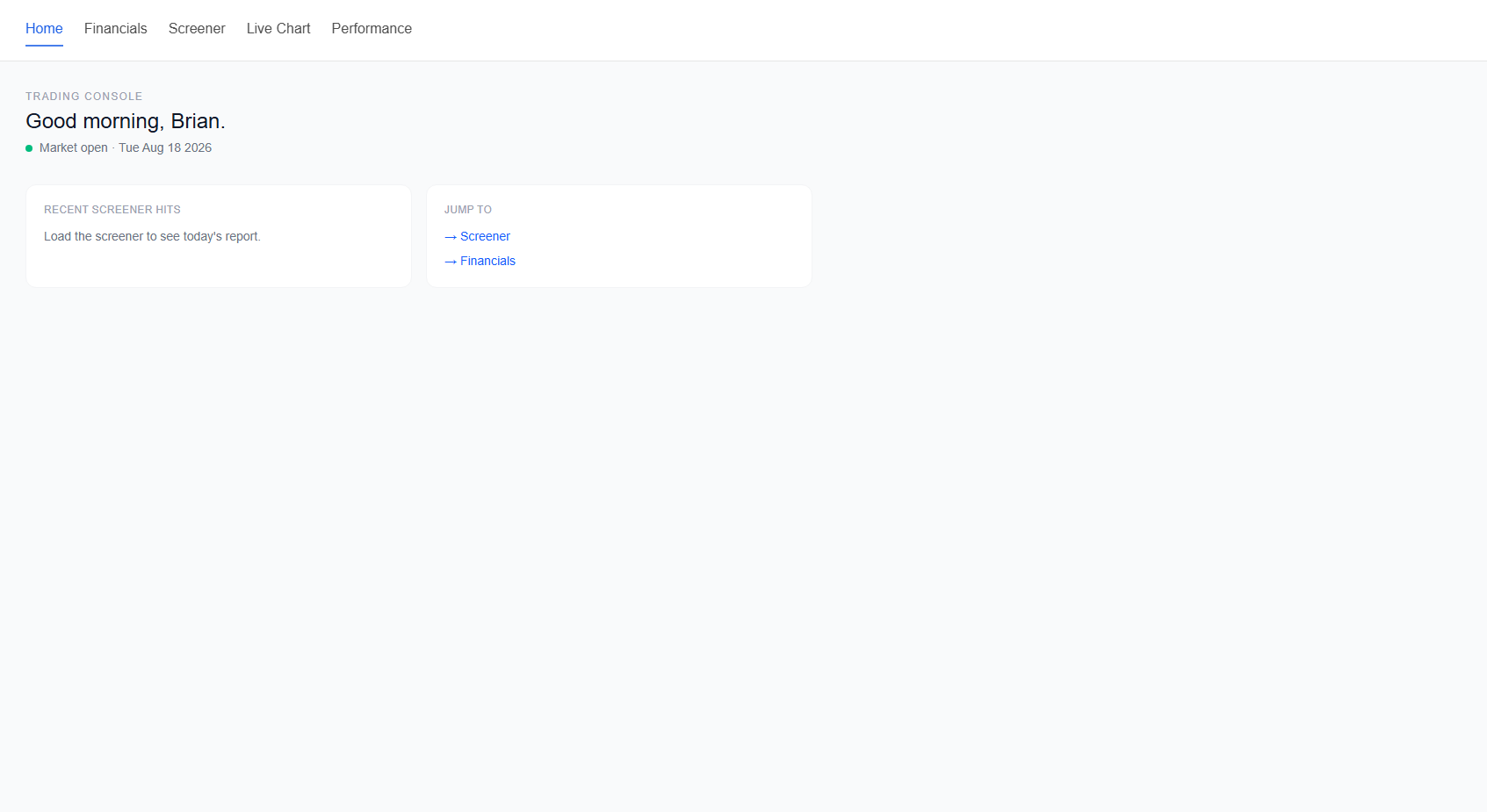
This is the service which displays information such as fundamental data, strategy performance and backtesting results. The service consists of a FastAPI backend, a NextJs frontend and the aforementioned Frontend Bridge for websocket communication.
Emerging Stocks Momentum Strategy
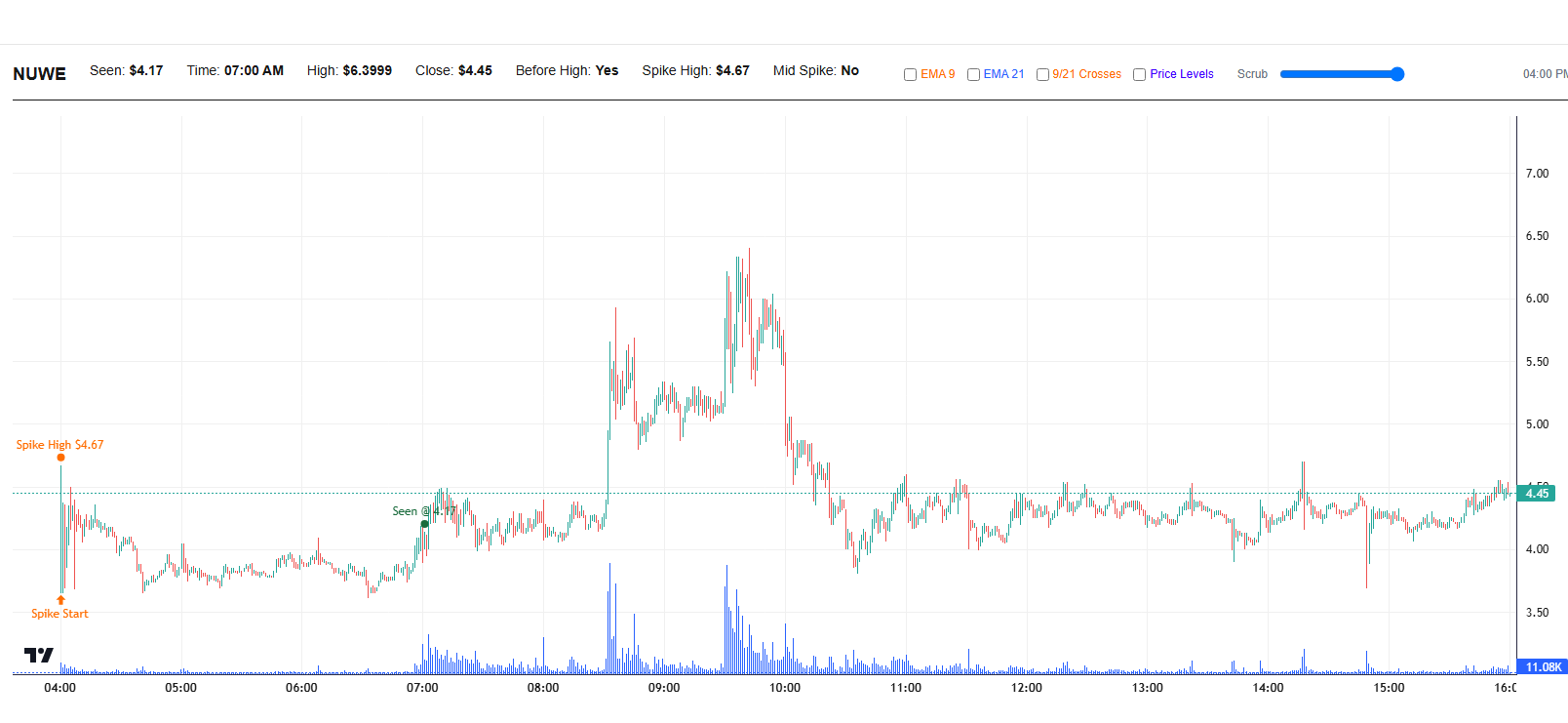
The momentum stocks trading strategy is an outlier detection problem. I am looking at the 1-minute and 5-minute timeframe for bars that can indicate that the stock will have future upward movement. The general idea is that if there is a large bar with large volume, the stock price is likely to trend upward following it.
The core of the problem is defining what "large" is. Fortunately, this boils down to a simple machine learning problem, hyperparameter optimization. I personally used Bayesian Optimization to tune the parameters for this strategy. If you want to read about the details, I will releasing a follow up article and linking it here
Buy on Gap Reversal Strategy
The gap reversal strategy combines a mean reversion on a higher timeframe with momentum based trend following on a intra-day timeframe. The strategy is designed to trade in a sideways market on a daily timeframe. We look for a big move (greater than ATR) that breaks the 9/21 EMA. Normally this is followed by a number of red candles. We are hunting for the first green candle the break the close.
Once we find the green candle, we want to ride the mean reversion back to EMA levels and exit.